
The integrated GPS of a Citroën C4 relies on an accurate embedded system (RT6, SMEG, NAC, depending on the vehicle generation) whose mapping is only usable if it corresponds to the current road network. An outdated map does not just ignore a new roundabout: it can suggest longer routes, closed roads, or distorted travel times.
Updating this mapping first requires knowing which system is equipped in the vehicle, and then following a strict technical protocol to avoid any data corruption.
Identify the navigation system before downloading anything
The Citroën C4 has been equipped with several generations of embedded systems depending on the production year. The most common are the RT6 (eMyWay), the SMEG/SMEG+, and, on recent models, the NAC. Each uses a different map file format and a specific update medium.
To identify the installed system, the most reliable method is to access the central screen menu, then go to the “System Information” or “About” section. The name of the system and the current map version are displayed there. This step conditions everything else: downloading a file intended for an RT6 on a NAC system will not trigger any installation, or worse, will cause a blockage.
The official Citroën portal now operates with an identification logic based on VIN number. By entering this number on the manufacturer’s website, the system automatically detects the vehicle’s equipment and offers compatible files. This mechanism avoids download errors but requires having the VIN on hand (visible on the registration certificate or at the bottom of the windshield on the driver’s side). Performing a free GPS update for Citroën C4 relies entirely on this prior identification of the correct system.
Free GPS update for Citroën C4: what the offer really covers
The term “free” deserves careful reading. Several manufacturers, including Citroën, offer map updates at no cost, but this free service is often subject to specific conditions.
The free service depends on the generation of the system and sometimes on a time limit after the vehicle purchase. On some recent models equipped with a connected system, map updates may be included in a time-limited connected services subscription. For older systems (RT6, SMEG), map files have been made available for free on the manufacturer’s portal or through dedicated tools, but their availability may change.
Paid updates generally concern maps with extended coverage (entire Europe rather than just one country) or the latest versions on systems nearing the end of support. Before ordering anything, checking the official portal for what is offered for the vehicle’s VIN remains the safest approach.
Preparing the USB key and map files
Once the system is identified and the correct files downloaded, preparing the physical medium requires diligence. Most Citroën C4 systems use a USB key formatted in FAT32 as the update vector.
- The key must have sufficient capacity to hold all the map files, which can weigh several gigabytes depending on the chosen geographical coverage.
- Formatting in FAT32 is imperative: NTFS or exFAT formatting will render the key invisible to the embedded system. On Windows, the native formatting tool or a third-party utility can force FAT32 on high-capacity keys.
- The key must be completely empty before copying the update files. No other documents, photos, or folders should be present, as they may interfere with reading by the system.
- The downloaded files must be placed at the root of the key, without renaming them or altering the structure provided by the download portal.
A detail often overlooked: some USB 3.0 keys are not recognized by older embedded systems. In case of doubt, using a standard USB 2.0 key eliminates this compatibility risk.
Verifying the integrity of the download
Map files are large. An interrupted download or an unstable connection can produce a corrupted file. Some portals offer a verification hash (MD5 or SHA) to compare with that of the downloaded file. If this option is available, use it before copying anything to the key.

Installation on the vehicle: power supply and system stability
The installation step itself is the most sensitive. The embedded system will read, decompress, and write the map data into its internal memory, a process that tolerates no interruptions.
The vehicle’s engine must remain running throughout the operation. Turning off the ignition during the update can corrupt the navigation system’s memory, potentially requiring a reset at the dealership. Recent manufacturer guides emphasize this point, and feedback from forums confirms that most update failures are related to power interruptions.
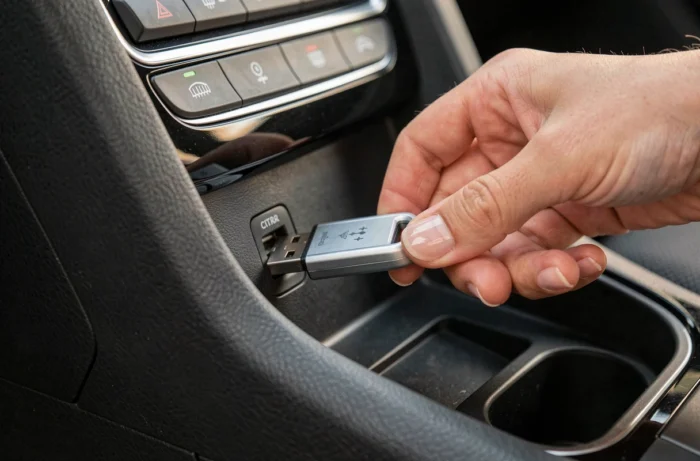
Once the USB key is inserted into the dedicated port, the system’s screen usually displays an update prompt. The operation can take varying amounts of time depending on the volume of data. During this period, do not remove the key, turn off the vehicle, or use other functions of the multimedia system.
Restarting the system after installation
On some versions, an automatic restart of the navigation system occurs at the end of the process. On others, a manual restart (turning off and then back on the ignition) is necessary to finalize the writing of the data. The “About” or “System Information” menu can then be used to verify that the new map version is indeed active.
Testing a route to a recent address (new business area, modified road) is the most concrete way to confirm that the map has been updated correctly. If the system suggests a coherent route to a recent point of interest, the update has worked properly.